Overview
When you ship a chat-shaped UI on top of a multi-step agent, you have a problem: the user wants the answer fast, but you also want the receipts — the reasoning, the tool calls, the intermediate results — available for anyone who asks. If you stream every step inline, the chat becomes unreadable. If you hide them entirely, the agent is a black box.
The pattern Imaginate landed on is a small "✦ see thoughts" affordance next to each assistant message that, when clicked, slides a right-side overlay over the conversation showing every step the agent took: tool calls, arguments, results, and any reasoning text the model produced. The chat stays clean. The receipts are one click away.
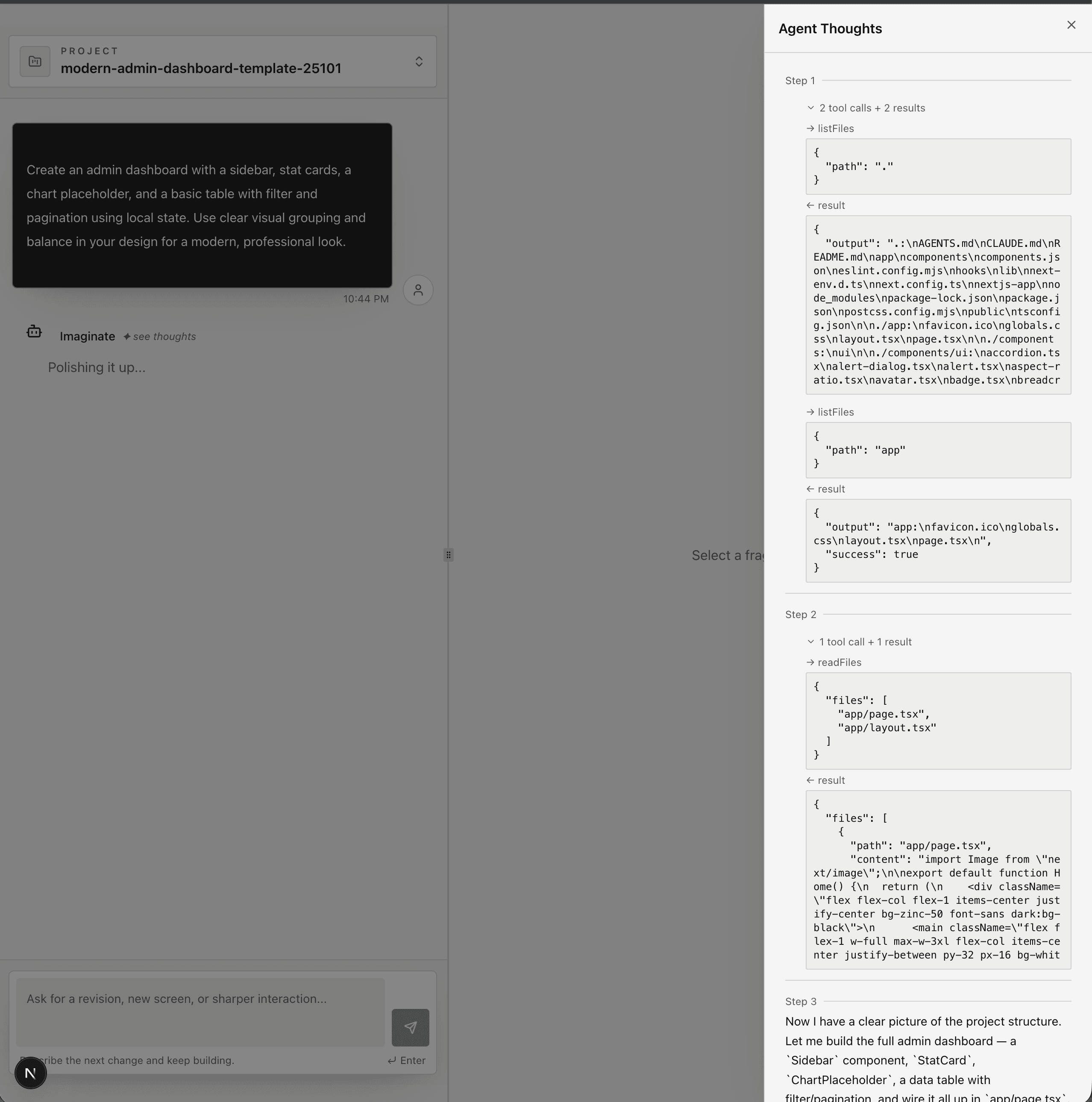
Try Imaginate or browse the source for this pattern under
src/features/projects/presentation/project/components/.
Architecture
The whole pattern is three pieces wired together end-to-end: a typed Thought shape that the agent runtime emits, a persisted snapshot the UI polls for, and a Sheet-based overlay that lazily renders one message's thoughts at a time. The constraint that shapes the design: the agent runtime is the single source of truth for the thoughts array — the UI never reconstructs it, only displays it.
A thought is a step, not a token
The unit of display is a step (an iteration of the agent's generateText loop), not a token. Each step has the model's text, optional reasoning, and the tool calls that fired during that step. The schema is shared between the agent and the UI:
export const ThoughtSchema = z.object({
  stepIndex: z.number(),
  text: z.string(),
  toolCalls: z.array(ThoughtToolCallSchema).optional(),
  reasoningText: z.string().optional(),
  finishReason: z.string().optional(),
});

export const ThoughtToolCallSchema = z.object({
  callId: z.string(),
  toolName: z.string(),
  args: z.record(z.string(), z.unknown()),
  completion: z
    .discriminatedUnion("ok", [
      z.object({
        ok: z.literal(true),
        durationMs: z.number().optional(),
        result: z.unknown(),
      }),
      z.object({
        ok: z.literal(false),
        durationMs: z.number().optional(),
        error: z.object({
          /* ... */
        }),
      }),
    ])
    .optional(),
});
The discriminated union on ok matters in the UI: the overlay renders a ← result block for successes and a ← error block for failures with the same shape, and TypeScript narrows the body for free. completion is optional because a tool call can be in-flight — we display the args immediately, then patch the result in when it lands.
The agent loop appends, the sink persists
The agent runtime in src/agent/application/execute-run.ts owns the thoughts array. Every time the AI SDK fires onStepFinish, the runtime snapshots the step and pushes it onto a single array, then emits an ExecutorStepFinished event:
onStepFinish: async (stepResult) => {
  const snapshot = snapshotFromStep(stepResult);
  const toolCallIds = [
    ...(completedToolCallIdsByStep.get(snapshot.stepIndex) ?? []),
  ];

  const contextBefore = thoughts.length;
  thoughts.push(snapshot.thought);
  logContextMutation({
    logger: iterationLogger,
    op: "append",
    before: contextBefore,
    after: thoughts.length,
    reason: "executor step finished",
  });

  await Promise.all([
    deps.eventSink.emit({
      type: AgentRuntimeEventType.ExecutorStepFinished,
      step: snapshot,
      toolCallIds,
    }),
    telemetryPromise,
  ]);
},
The persistence sink listens for that event and writes the current snapshot of the array back to Postgres through the message workflow. There's one subtle correctness rule documented inline:
if (event.type === AgentRuntimeEventType.ExecutorStepFinished) {
  // The agent runtime is the single source of truth for the `thoughts`
  // array — `execute-run.ts` already appends each step before emitting
  // ExecutorStepFinished. The sink only persists the current snapshot;
  // pushing here would double-record every step.
  const projectedThoughts = projectThoughtsWithCompletions(
    thoughts,
    toolCallCompletions,
  );
  await messageWorkflow.recordThoughts({
    messageId: persistedMessageId,
    thoughts: projectedThoughts,
  });
}
The sink also keeps a Map<callId, completion> so that when a ToolCallCompleted event arrives between steps, the next persistence pass can patch the result into the right tool call without mutating what the runtime already pushed. This is what projectThoughtsWithCompletions does — a pure projection over the runtime's array.
The chat surface stays clean
On the read side, the MessagesContainer polls messages.getMany every 2 seconds via tRPC + React Query. Each assistant message carries its thoughts array directly on the row — no separate fetch, no separate subscription. The chat itself shows only one extra affordance per message:
{
  hasThoughts && (
    <button
      onClick={()=> message.thoughts && onViewThoughts(message.thoughts)}
      className={cn(
        "text-xs text-muted-foreground hover:text-foreground transition-colors cursor-pointer font-mono italic",
        isPending && "animate-pulse",
      )}
    >
      ✦ see thoughts
    </button>
  );
}
Two details worth highlighting. The button only renders when message.thoughts && message.thoughts.length > 0, so a fresh message with no steps yet doesn't show a dead button. While the message is PENDING, the affordance pulses — the user can open the overlay during the run and watch new steps stream in on each poll. No websockets, no SSE. Polling is enough because the overlay is a snapshot view, not a streaming console.
One overlay, lazy state, lifted handler
The MessagesContainer lifts the overlay's state up so there is exactly one <ThoughtsModal> mounted regardless of how many assistant messages are on screen:
const [thoughtsOpen, setThoughtsOpen] = React.useState(false);
const [selectedThoughts, setSelectedThoughts] = React.useState<
  Thought[] | undefined
>();

const openThoughts = React.useCallback((thoughts: Thought[]) => {
  setSelectedThoughts(thoughts);
  setThoughtsOpen(true);
}, []);

// ...
<ThoughtsModal
  open={thoughtsOpen}
  onOpenChange={setThoughtsOpen}
  thoughts={selectedThoughts}
/>;
Each AssistantMessage receives the openThoughts callback as onViewThoughts. Clicking the button sets which message's thoughts to display and opens the sheet. This keeps the overlay component cheap (no per-row mounts), keeps the open/close transition smooth (only one panel animates), and keeps the data path one-way: parent owns selection, child renders.
The overlay itself
The overlay is a shadcn Sheet anchored to the right edge. It's a fixed-width panel on desktop (sm:w-[500px]) and full-width on mobile, with a dark zinc surface to visually distinguish "the receipts" from the conversation underneath:
<Sheet open={open} onOpenChange={onOpenChange}>
  <SheetContent
    side="right"
    className="w-full sm:w-[500px] flex flex-col bg-zinc-950 text-zinc-100"
  >
    <SheetHeader className="border-b border-zinc-800">
      <SheetTitle className="text-zinc-100">Agent Thoughts</SheetTitle>
      <SheetDescription className="sr-only">
        Step-by-step reasoning and tool calls from the agent.
      </SheetDescription>
    </SheetHeader>

    <ScrollArea className="flex-1 min-w-0">
      <div className="p-6 space-y-4 min-w-0">
        {thoughts.map((thought, idx) => (
          <div key={idx} className="space-y-2">
            <span className="text-xs font-mono text-zinc-500">
              Step {thought.stepIndex + 1}
            </span>
            <p className="text-zinc-200 text-sm leading-relaxed">
              {thought.text}
            </p>
            {thought.reasoningText && (
              <div className="ml-6 mt-2 text-xs text-zinc-400 italic border-l border-zinc-700 pl-3">
                {thought.reasoningText}
              </div>
            )}
            <ToolCallsSection thought={thought} />
          </div>
        ))}
      </div>
    </ScrollArea>
  </SheetContent>
</Sheet>
Within each step, tool calls are collapsed by default behind a single line — 2 tool calls + 2 results — and a Collapsible expands them into the full → toolName / args / ← result triptych. The default-collapsed choice is deliberate: a 15-step run can produce dozens of tool calls, and most readers want to scan the step text first and only expand the calls they care about.
Difficult Parts
Avoiding double-write between runtime and sink
The runtime's onStepFinish mutates thoughts directly so its own stopWhen predicates can read the most recent step text. The persistence sink also receives ExecutorStepFinished and needs to write something to the DB. The naive shape — sink also pushes onto its own array — duplicates every step. The fix was to make the sink stateless about the array (it just reads the runtime's thoughts reference) and stateful only about completions (the Map<callId, completion>), then project. The inline comment in agent-adapter.ts exists specifically because this is the kind of bug that would silently double everything.
In-flight tool calls have to render
ExecutorStepFinished fires after the model finishes a step, but ToolCallCompleted events can arrive between steps as the sandbox finishes individual calls. If the UI only renders calls that have a completion, every newly-fired call would be invisible until the next step boundary. The schema solves this by making completion optional and the UI rendering the → arrow with args immediately and the ← result block conditionally. Once the next persistence pass projects completions in, the result block fills in on the next 2-second poll.
Polling vs. streaming
I went back and forth on whether the thoughts panel should be a streaming SSE channel or a poll. Streaming would feel snappier during long runs, but it doubles the transport surface (chat is already polled), and a 2-second refetch is fine when the agent itself takes 5-15 seconds per step. The right call was to keep one transport for "everything about a project" and accept the latency. If the panel ever needs sub-second updates, the snapshot-shaped data already in Postgres makes it trivial to add a Postgres LISTEN/NOTIFY-backed subscription on top without changing the schema.
Lifting state without making the chat re-render
AssistantMessage is wrapped in React.memo, and the onViewThoughts callback passed in from the container has to be stable or the memo is useless. useCallback with an empty dependency array works because setSelectedThoughts and setThoughtsOpen are state setters (already stable), but it's the kind of detail that's easy to miss — every other prop on AssistantMessage is also referentially stable so the memo actually pays off, even when 20 messages are on screen and the list re-renders on every 2-second poll.